Top Features of InShot Pro APK You Should Know Before Installing
Why Read This Before Installing
Before you sideload any modified app onto your Android phone, it pays to know exactly what you are getting. A feature list on a download page is helpful, but it rarely tells you how a tool behaves in a real editing session, or which features actually matter for the kind of videos you want to make. This article walks through the headline features of the InShot Pro APK, explains what each one does in plain language, and flags the limits you should be aware of before you tap install. By the end you will know whether the Pro build is the right editor for your workflow, or whether the free version of InShot would actually do the job.
This is a third-party build, not the official release. That single fact shapes the rest of the conversation, so we will come back to it at the end. For now, let us look at the features.
At a Glance: What You Get
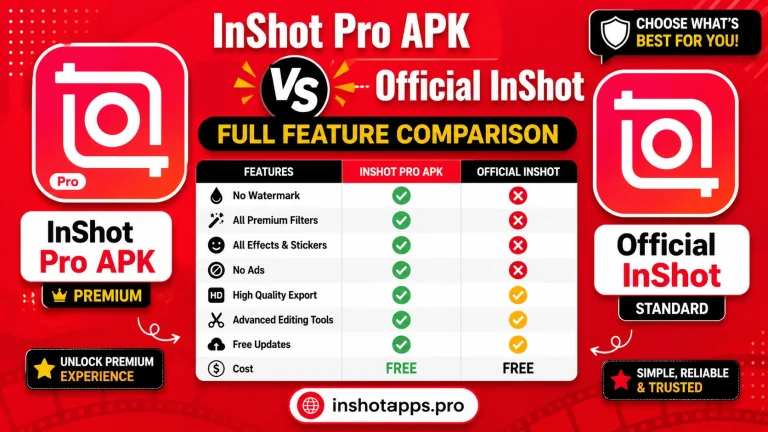
Here is a quick comparison of what the Pro build unlocks compared with the free version of the official InShot app.
| Feature area | Free InShot | InShot Pro APK |
|---|---|---|
| Watermark on export | Yes, small InShot tag | None |
| Filters | Basic set | Full premium library |
| Effects and transitions | Limited | Full premium library |
| Stickers and emoji | Small selection | Full library plus seasonal packs |
| Music library | Preview only, some locked | Full library, no preview lock |
| Export resolution | Up to 1080p | Up to 4K |
| Ads inside the editor | Yes | No |
| Auto-updates via Play Store | Yes | No |
| Subscription fee | Optional monthly or annual | None |
| Source of build | Official developer | Third-party resource such as inshotapps.pro |
If a row reads the same in both columns, the Pro build does not change anything in that area. The next sections dig into the rows that do change.
Video Editing Tools
The core editing toolkit in the Pro build is essentially the same as the official app, and that is a strength. You are not learning a new editor. The tools include trim, split, cut, duplicate, speed control, reverse, freeze frame, and a basic canvas resize. Each of these is one tap away in the timeline at the bottom of the screen.
What changes with the Pro build is how far you can push those tools. Speed control, for example, supports both fast and slow motion up to 5x in the free version and 8x or more in the Pro build. Freeze frame, which is a single still image that holds on screen for a beat, can be extended in the Pro build to any duration you want, where the free version caps it at a few seconds. If you make reaction clips, sports highlights, or short comedy skits, those expanded ranges are more useful than they sound.
Filters, Effects, and Color Tools
Filters are where most people first notice the difference between the free and Pro builds. The free InShot ships with a small curated set, and the more cinematic looks sit behind the paywall. The Pro APK unlocks the entire filter library on first launch. The list is long, but it breaks down into a few families.
- Vintage and film looks: warm tones, soft grain, faded blacks, and a slight vignette.
- Cinematic presets: anamorphic flare, teal-and-orange, moody high contrast, and cool blues.
- Lifestyle presets: bright, soft, airy, and golden hour.
- Vertical-first presets: tuned for portrait phone video, including simulated bokeh and subtle skin smoothing.
- Editorial looks: clean, modern, magazine-style grading for talking head clips.
Effects and transitions are unlocked the same way. The Pro build includes a wide set of transitions, including several that the free app does not offer, plus animated overlays that work well for intros and outros.
Audio and Music
Audio is half of any good video, and the Pro build treats it that way. The full music library is open, including the trending tracks that are usually locked behind the subscription. You can layer multiple audio tracks, fade in and out, and adjust volume per track with a simple slider. There is also a built-in voiceover tool that records directly into the timeline, which is convenient for vlog-style edits.
A nice touch in the 2026 refresh is the louder master output, which means your exported videos do not need an extra pass through another app to bring them up to social-platform volume. The ducking option, which automatically lowers the music when a voiceover is playing, is also unlocked in the Pro build. None of this is revolutionary, but together it removes several small frustrations that add up during a long edit.
Stickers, Text, and Graphics
The Pro APK opens the full sticker and emoji library. The free version gives you a starter set and a few premium packs, but the Pro build includes every pack the developer has ever shipped, plus seasonal packs that are refreshed through the year. The text tool in the Pro build also unlocks a wider range of fonts, including several that look good as titles on short-form platforms.
A small but useful detail: in the Pro build, you can save your own text styles so the same look is one tap away across multiple projects. If you are building a series on a single channel, that consistency is genuinely valuable.
Canvas, Aspect Ratio, and Export
InShot has always been strong on canvas and aspect ratio. The Pro build keeps every option the free version offers and adds a couple of refinements.
| Canvas | Use case | Pro support |
|---|---|---|
| 9:16 vertical | TikTok, Reels, Shorts | Yes, with safe-area guides |
| 1:1 square | Instagram feed | Yes |
| 16:9 landscape | YouTube | Yes |
| 4:5 portrait | Instagram portrait posts | Yes |
| Custom | Any platform with a unique ratio | Yes, up to 4K |
The export panel in the 2026 Pro build also lets you save a custom preset, which is helpful if you often publish the same kind of video at the same quality.
Limitations to Keep in Mind
No editor is perfect, and the Pro APK is honest about its limits. A few things to know up front.
- No cloud project sync. Projects live on your device. If you uninstall the app, your work goes with it.
- No official support channel. Because the build is third-party, you cannot contact the original developer for help. Communities and guides like the ones on inshotapps.pro are your best fallback.
- No auto-updates. You have to revisit the download source to grab a new build when one is released.
- No native desktop companion. If you edit on a laptop as well, you will need a different tool for that side of the workflow.
Most of these limits are not deal-breakers, but they are real. If you rely on cloud sync, the Pro APK is not the right tool.
Who the Pro APK Is Best For
Pulling it all together, the Pro build of InShot is a strong fit for the following kinds of creators.
- Casual editors who post a few short videos a month and do not want a subscription.
- Students making class projects, where a watermark would be awkward.
- Small business owners who need a quick promotional clip without paying for an editor.
- Anyone testing the waters of short-form content before committing to a paid editing suite.
If you fall into one of those groups, the Pro APK is a sensible pick. Make sure to grab the latest build from a resource like inshotapps.pro, scan the file with a security app, and you are ready to edit.
Frequently Asked Questions
Does the Pro APK really remove the watermark?
Yes. The watermark on export is disabled in the Pro build, so your finished clips do not carry the small InShot tag.
Are all filters and effects unlocked on the first launch?
Yes, the full filter, effect, transition, and sticker libraries are unlocked as soon as you open the app. There is no second paywall inside the Pro build.
Can I still use my own music in the Pro APK?
Yes, the editor still pulls in audio from your phone storage as well as the in-app library, so imported music works the same way it does in the official app.
Is the editing experience slower on older phones?
It can be, particularly at 4K. Most users on phones older than four years get the best results by exporting at 1080p and keeping projects under ten minutes.
What happens if I lose my projects when I upgrade?
Because there is no cloud sync, projects stay on the device. The safest habit is to export and save your finished videos to your gallery or cloud storage before installing a new build over the top of the old one.
Conclusion
InShot Pro APK is a thoughtful repackage of an already capable editor. The unlocked filters, the removed watermark, the wider music library, and the lack of in-app ads are real upgrades that change how the editor feels day to day. The trade-offs are the ones that come with any third-party build: no auto-updates, no cloud sync, no official support. If those trade-offs fit the way you work, the Pro APK delivers the full InShot experience for free. Make sure you grab the file from a resource you trust, and revisit inshotapps.pro, Whenever you want a fresh build, a new changelog, or a quick reminder of what is new.